Your notifications. Your rules.
NotiPilot watches the notifications on your Android phone and does what you tell it to: clear the noise, sound an alarm for what matters, read a message aloud or copy a code.
Three example rules at work
- Shopping app 50% off, today only! Dismissed
- Messages Call me ASAP, urgent Alarm sounds
- SMS Your verification code is 482913 Code copied
 NotiPilot is running
Illustration with sample messages. Each outcome matches a built-in template.
Rules for any notification
A rule reads like a sentence: when a notification matches, do something about it. You choose the apps, the conditions and the actions.
What a rule can match
Combine as many conditions as you need. A rule can require every condition to match, or just one of them.
-
Text
Look for words in the title, the message or the sender's name. Contains, exact match or regular expression, and the opposite of each.
-
Time
Before, after or between times of day. You can also limit a whole rule to the hours and days you pick.
-
Sender
Match people on a list you write, or everyone who is not on it.
-
Importance
Compare how important Android considers the notification: higher than, lower than or equal to a level.
-
Apps
Point one rule at a single app, several apps or any app.
What a rule can do
Add several actions to one rule and they run in the order you set.
-
Dismiss
Clear the notification before you have to look at it.
-
Snooze
Hide it now and bring it back after the time you choose.
-
Alarm
Play a loud alert. It can take your phone off silent or vibrate so you hear it. Do Not Disturb can still block that.
-
Vibration
Presets such as heartbeat, SOS and pulse, or a pattern of your own.
-
Flashlight
Blink the camera light a set number of times.
-
Speak aloud
Read the app, title and message out loud with text-to-speech.
-
Copy
Copy the message, or only the part a pattern picks out, like a one-time code.
-
Remind
Alert you again every few minutes, up to a limit you set.
-
Cooldown
Skip further notifications from the same app for a while.
Alarms play on the media stream, so they follow your media volume and mix with your music.
Start from a template
Six ready-made rules. Pick the apps and adjust anything before you save.
- OTP Auto-CopyCopies the code from verification messages and dismisses the notification.
- Urgent AlertsSounds an alarm and keeps reminding you when a message says urgent, critical, emergency or ASAP.
- Batch OvernightSnoozes notifications from 11 PM to 7 AM.
- Silence SpamDismisses promotional notifications such as sales, offers and discounts.
- VIP ContactsVibrates for messages from the people on your list.
- Focus ModeClears notifications from 9 AM to 5 PM on weekdays.
Stay in control
Turn rules on and off without digging through the app.
-
Rule groups
Collect rules into groups, such as Work or Sleep, and switch a whole group at once.
-
Quick Settings tile
Toggle a rule or a group from the notification shade.
-
History
See which notifications matched, and start a new rule from one you just received.
-
Import and export
Back up your rules as a JSON file or share them.
How it works
Set it up once. NotiPilot does the rest in the background.
-
Allow notification access
Android asks for your permission before an app can see notifications. NotiPilot walks you through it the first time you open it.
-
Write a rule, or start from a template
Pick the apps, add conditions, choose actions and review. Templates fill most of it in for you.
-
Let it run
NotiPilot applies your rules as notifications arrive. The History screen shows what matched and what it did.
Inside a rule: the Urgent Alerts template
What you see when you review it before saving.
- Apps
- Suggests Slack, Microsoft Teams and Gmail. You can choose any apps.
- When
- The title or message contains urgent, critical, emergency, important, asap or immediately.
- Then
-
- Play an alarm for 5 seconds, taking the phone off silent
- Remind you every 2 minutes, up to 5 times
A look at NotiPilot
Alerts that cut through, and one-tap control of your rules.
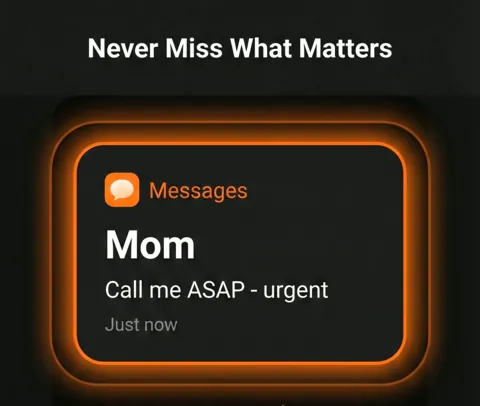
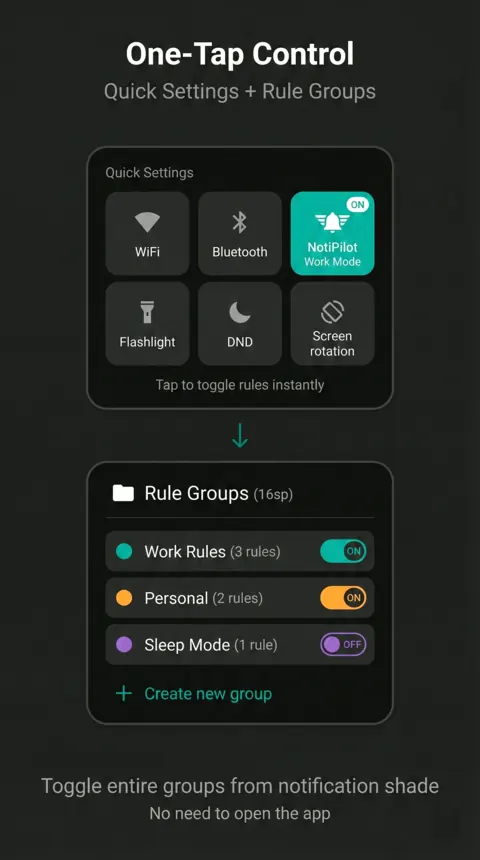
Artwork from the Google Play listing. Names and some details are illustrative.
Rules run on your phone, not on our servers
NotiPilot reads notifications only to check them against your rules. There is no NotiPilot account and no NotiPilot server your notifications are sent to.
-
Stored on your device
Your rules, notification history and settings live in the app's own storage on your phone.
-
You set how long history is kept
The default is 7 days. You can change it, and you can turn off saving notifications that did not match any rule.
-
Standard Android components
Google Play services and a security library that checks device integrity run inside the app. The privacy policy explains what they handle.
-
Each permission has one job
The privacy policy lists every permission NotiPilot asks for and what it is used for.
Questions, answered
Why does NotiPilot need Notification Access?
Android only lets an app see other apps' notifications if you grant Notification Access. NotiPilot uses it to read each notification as it arrives, check it against your rules, and then act on that one notification: dismiss it, snooze it, sound an alert and so on.
It observes and acts on notifications. It does not turn Do Not Disturb on or off, and it does not edit other apps' notification channels. You can take the access back at any time in Android settings.
Can NotiPilot see my messages?
To apply your rules it reads the app name, title and text of each notification, on your phone. If history is on, those details are saved in the app's local storage for the number of days you choose (7 by default). You can also switch off saving notifications that did not match a rule.
Does it change my sound or Do Not Disturb settings?
Only the alarm action touches sound settings. It can switch your ringer from silent or vibrate to normal so you hear the alert, and it puts the ringer back afterwards. Do Not Disturb can still block this.
Alarms play on the media stream so they mix with your music instead of pausing it. That means their loudness follows your media volume.
Is NotiPilot free?
Yes.
Which phones does it work on?
Android 13 or newer.
How do I get help?
Email support@notipilot.app. Tell us your phone model and Android version and what the rule was meant to do.
Put your notifications on autopilot
Start with a template, then make it yours.
Coming soon onGoogle Play Get it onGoogle Play